I Will Be There

For attendees who came to connect

I will be there.
Will you?

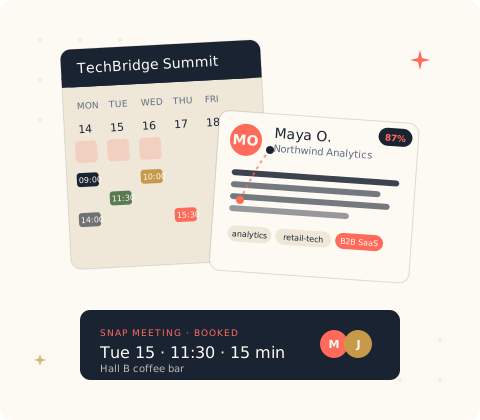
Everyone knows who the Sponsors are at events. This is aimed at connecting Attendees at an event. IWBT supercharges your networking by matching every attendee based on their elevator pitch and USP tags.

Find the Right People → Request to Meet → Confirm a time and place based on your event calendar available slots.

The best part — it's FREE!
I have been given an event code and want to join someone's Event Hub

For event organisers — sign in to manage your event and attendees

I am going to create my own event hub and share the event code for other attendees to book meetings with me and each other

I am hosting an event, and I am going to provide an event hub and share the event code for all attendees and participants to use to arrange meetings

01

Pitch yourself

200 words, tags, and the days you'll be on the floor.

02

Find synergies

AI ranks attendees by overlap with what you do.

03

Snap a slot

Request a short meet. They accept. The calendar fills itself.

Welcome back

Sign in to view all your events and meetings.

First time?

Set your password

Choose a new password to finish signing in.

✉️

Confirming your email…

I Will Be There

Upcoming & in progress

Loading…

Past events

Loading…

I Will Be There

Other events on the platform, ranked by relevance to your interests and any active promotions.

Loading…

I Will Be There

Profile defaults

These pre-fill the registration form when you sign up for a new event. You can always override per-event.

Change password

Privacy & data

Under UK GDPR you have the right to access and to erase your personal data. See our Privacy Policy for details.

I Will Be There

Register for an event

Takes about two minutes. Only seven fields.

Create a Corporate Event Hub

Run your event on I Will Be There. Attendees register, find synergies, and book meetings before they arrive.

How it works for organisers

  • Create an event with a unique code. Set dates, synopsis, tags.
  • Attendees register with the code and build their profile.
  • Optionally buy sponsor banners, compact ads, and bonus email allowance to monetise.
  • Track engagement: registrants, meetings booked, banner impressions.

Pricing

Free for the foreseeable future — we will give 90 days notice before changing our charging model.

  • Attendees — always free.
  • Personal event hubs — always free.
  • Corporate events — free for up to 500 attendees per event, within reasonable-use limits. Larger events: get in touch.

Already have an organiser account?

Not sure if you need corporate?

Personal vs Corporate Event Hub

Both are free during preview. Pick the one that fits how you'll use it.

Personal Event Hub

Small meet-ups, dinners, interest groups. Up to 200 attendees per event.

  • Free, no credit card
  • You set up in under 2 minutes
  • Attendees register with your event code
  • In-app messaging only — no emails sent
  • Attendee emails are private (only you see names)

Corporate Event Hub

Larger events with proper organiser account, sponsorship, branding.

  • Free during preview
  • Organiser account with full event dashboard
  • Sponsor banners + paid ad placements
  • Email notifications between attendees
  • You see attendee emails for support

Feature-by-feature

Capability Personal Corporate
Cost & setup
Free during preview
Setup time~2 minutes~5 minutes
Attendee cap200 (request increase if needed)Unlimited
Attendee experience
Discover other attendees by tags & pitch
Request meetings + accept/decline
Calendar with available slots
Withdraw own request / cancel own meeting
Email notifications when others reach out❌ In-app badges only✅ Email + in-app
Organiser tools
Edit event details, dates, location
Cancel a specific meeting between attendees
Withdraw a specific request
Block an attendee from this event
Request IWBT to globally block an attendee
Share event on LinkedIn / Facebook / X / WhatsApp
Monetisation & branding
Sponsor banner imagery
Sponsor branding included in attendee emails
Paid compact ad placements
Custom email allowance packs
Daily digest emails to attendees
Privacy & communications
Email notifications between attendees❌ Suppressed✅ Enabled
Admin-bound emails (cap requests, block requests, password resets)✅ Always allowed✅ Always allowed

Create your event

Run a small meet-up, dinner, or interest-group session. You'll get a code attendees can use to register.

Event details

Optional — the daily window meetings run in. Defaults to 09:00–17:00.

If unchecked, you'll be the organiser but won't appear in the attendee list. You can still manage the event from your account.

Create your Corporate Event Hub

Run your event on I Will Be There. You'll get a code attendees use to register, find synergies and book meetings.

Event details

Optional — the daily window meetings run in. Defaults to 09:00–17:00.

I Will Be There
Personal events you've created

Your personal events

Edit details, manage attendees, request a cap increase if needed.

I Will Be There

Find your synergies

AI ranks fellow attendees by how well your pitch and tags align.

Meeting requests

Your booked meetings

All confirmed snap meetings for this event.

Your event profile

Visible to other attendees at this event. Update Attendance separately for the days you'll be there.

Your attendance

Pick the days you'll be at this event and the hours you're available for meetings. Removing a day with existing meetings will prompt you to cancel them.

I Will Be There

All requests across your events

Requests you've sent and received in every event you're part of.

I Will Be There

All your meetings

Confirmed and cancelled meetings, grouped by event.

Reset your password

We'll email you a link to set a new password.

Set a new password

Pick something only you know. At least 8 characters.

Event organiser

Sign in or create your event.

I Will Be There · Organiser

Your events

Your profile

Update your account email or change your password.

Changing your email will require you to sign in again with the new address.


Change password

Pricing

Status: Free for the foreseeable future

We will give 90 days notice before changing our charging model.

  • Attendees — always free.
  • Personal event hubs — always free.
  • Corporate events — free for up to 500 attendees per event, within reasonable-use limits. Larger events: get in touch.
🔒

Administrator

Database access is gated behind admin credentials.

I Will Be There · Admin

Platform overview

Performance by event

Event Organiser Dates Attendees Requests Bookings Ads running Ads sold Revenue
Loading…

Users

Find any user across all events by name, email, or company — attendees, organisers and admins.

Filter:

Blocklist

Emails on this list cannot register for any event.

Events browser

Drill down by organiser to see each event, its ads, and attendees.

Database tables

Raw access. Only visible to admin.


Ad sales

Two ad types: Banner (large top-of-page placement — one per page per event, currently free, charged in future) and Search Advert (small rotating card inside attendee lists — paid placement).

Each event with its ad schedule. Active-today ads are highlighted. Use this to diagnose why an ad isn't showing.

Event promotions boost an event's ranking on the attendee Discover Events list. Sold like ads.

New promotion

A promotion cannot start before or end after its event.

All promotions

An ad cannot start before or end after its event. The system will reject mismatched dates.

Daily rates

Rates are applied at purchase time. Existing purchases keep their original cost.

Email throttle

Caps on outgoing email — your safety net against runaway sends or spam bot abuse.

Recent activity

Approvals queue

Anything organisers have asked you to action.

Feature flags

Toggle billing for each paid surface. Each flag stays off until Stripe is configured AND you flip the master switch.

Support Queue

I Will Be There · Help

How-To Guides

I Will Be There · Help
I Will Be There

My Support Requests